
Usage at a glance
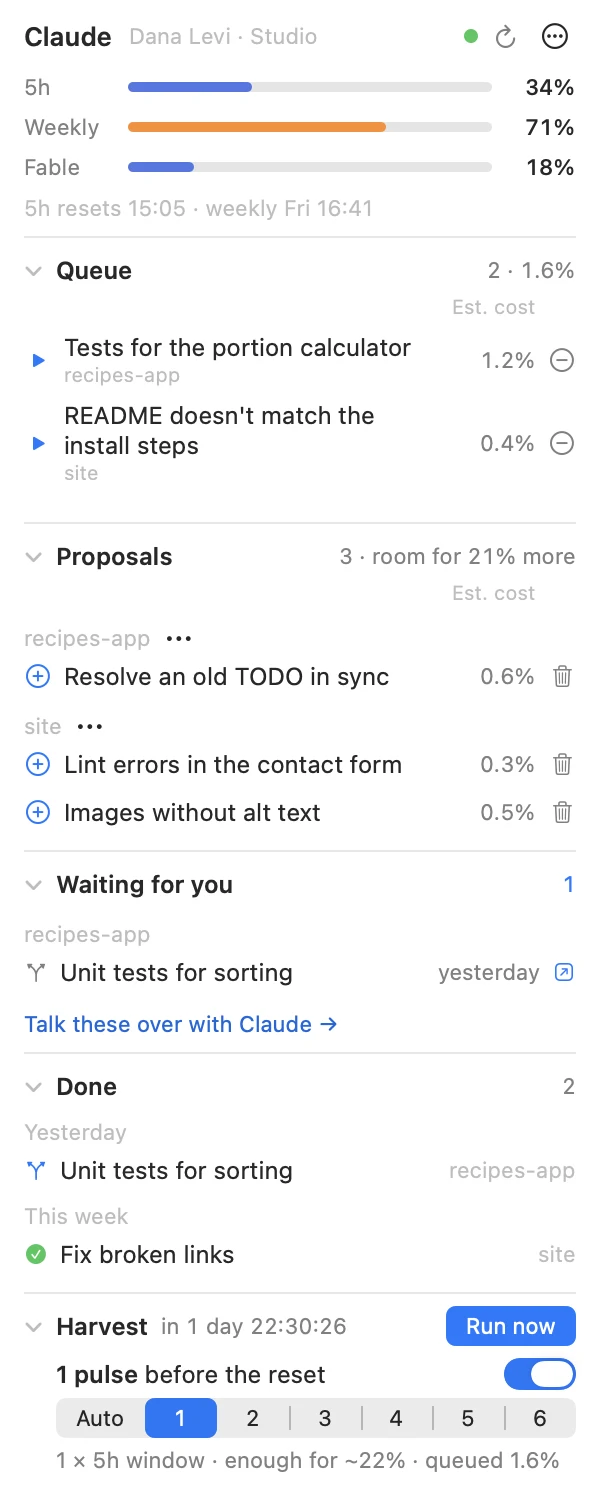
Three small gauges in the menu bar — the 5-hour window, the week and the per-model limit — orange from 70 %, red from 90 %.
Open source · macOS · for Claude Code
Harvest Season shows your Claude plan limits in the menu bar and, before the weekly reset, spends what is left on the small tasks your projects keep postponing — each on its own git branch, merged only when you say so.
Claude Code, Codex, Cursor — paste the line below into any coding agent on your Mac. It follows a short guide written for agents: checks the machine, asks you for your name and language, builds the app and installs the harvest, and tells you what only you can click.
Install Harvest Season on my Mac. Follow the instructions at https://github.com/yairixStudio/harvest-season/blob/main/INSTALL-WITH-AGENT.md git clone https://github.com/yairixStudio/harvest-season.git
cd harvest-season
./installThen click “Set up the harvest…” in the panel. · macOS 15+ · Claude Code with a Pro or Max plan
Plan quota you don’t use is gone at the reset. Harvest Season turns it into finished small tasks — tests, docs, cleanups — that you review like any pull request.
Three small gauges in the menu bar — the 5-hour window, the week and the per-model limit — orange from 70 %, red from 90 %.
Every Claude Code session learns to note small “later” tasks in the project’s BACKLOG.md instead of doing them now or forgetting them.
Tasks an agent records on its own arrive as proposals. One click queues them; agents can never approve their own work.
Before the weekly reset it works through the queue in 5-hour pulses, as many as you choose — or as many as the quota left and the queue call for.
When a model’s own quota runs out mid-task, the session goes on with another model, context intact. At a shared limit the work is saved and resumes in the next pulse.
Every run is published through Remote Control: watch it in the Claude app, on your desktop or your phone, and write to it while it works.
Four steps, and you hold the only approvals.
Sessions record small tasks in each project’s backlog as they notice them.
You queue the ones you want, in your own order.
Before the reset, each task runs as its own session, in a git worktree, on its own branch.
“Waiting for you” walks you through each change and merges only on your word.
Every task ends on a local branch. Only you merge, and nothing ever leaves your machine on its own.
Credentials go only to Anthropic. No analytics, no other network calls.
Unattended runs can only propose. The queue, the settings and the texts are yours alone.
MIT-licensed. Every instruction the harvest gives its agents can be read and rewritten in Settings → Texts.
Yes. Harvest Season is free and open source under the MIT license. It spends quota you already pay for in your Claude plan.
A Mac with macOS 15 or later, the Xcode Command Line Tools, git, and Claude Code signed in with a claude.ai Pro or Max account.
No. It keeps a reserve of the 5-hour window free for you (15 % by default, you set it), runs before the weekly reset, and never starts a task that can’t finish before the reset.
Tasks run in separate git worktrees on their own branches. Nothing is pushed, merged, deployed or deleted; you review each branch and merge it yourself.
Not yet — it is macOS-only today. Windows support is open for contributors on GitHub.
Copy the line for your agent, or read the code first on GitHub.
If it saves you quota, a star on GitHub helps others find it.