
Simple folders that follow your site
Pages, Blog, Products, Services, Brand & logos, Videos & documents, and an Archive for files that aren’t used on any page. The folders are a proposal: change any of them.
FoldersApp for the Wix Media Manager · Free plan
Camera names like DSC_5021, exports like Frame 12, copies, and files nobody remembers. Media Organizer works out where each file is used on your site, then proposes simple folders and a clear name for every file. You review it all first. Nothing changes until you apply.
Open the app from your Wix dashboard. The scan and the review change nothing; the proposal becomes real only when you apply it.
Pages, Blog, Products, Services, Brand & logos, Videos & documents, and an Archive for files that aren’t used on any page. The folders are a proposal: change any of them.
FoldersAI looks at each image and at where it’s used, and names it: “Linen dress - front” instead of DSC_5021. Names are in your site’s language, or any language you pick.
NamesThe app reads your site’s public pages to see which pages show each file, so the folders follow your site. If your site isn’t published yet, nothing can be read: files then keep their folders and only get new names.
ScanFirst the names we gave your files, which you can edit. Then the few files that need you: say what they are, or use the AI’s best guess. Everything is saved as you go.
ReviewDrag files between folders, rename them in place, or tell the AI assistant in plain words: “put all logos in one folder”. It shows what it would change, and you press Apply.
AI assistant · ProEvery file keeps its web address, so every page shows the same images as before. Only the names and folders in your Media Manager change.
SafeOne click puts every file back in its old folder with its old name. Everything is saved. Old folders left empty go to the Media Manager trash, and Undo brings them back while they’re there.
UndoNew uploads get a name and a folder every week: automatically (“Organize it for me”) or after your approval (“Ask me first”). It runs when you open the dashboard on or after the chosen day, or when you click Tidy Up Now.
ProThe app’s pages are in English and Hebrew, right to left included. The names for your files can be in any language.
DashboardThe review shows the proposed folders, the new name next to the old one, and the few files that need you. Edit anything, then apply.
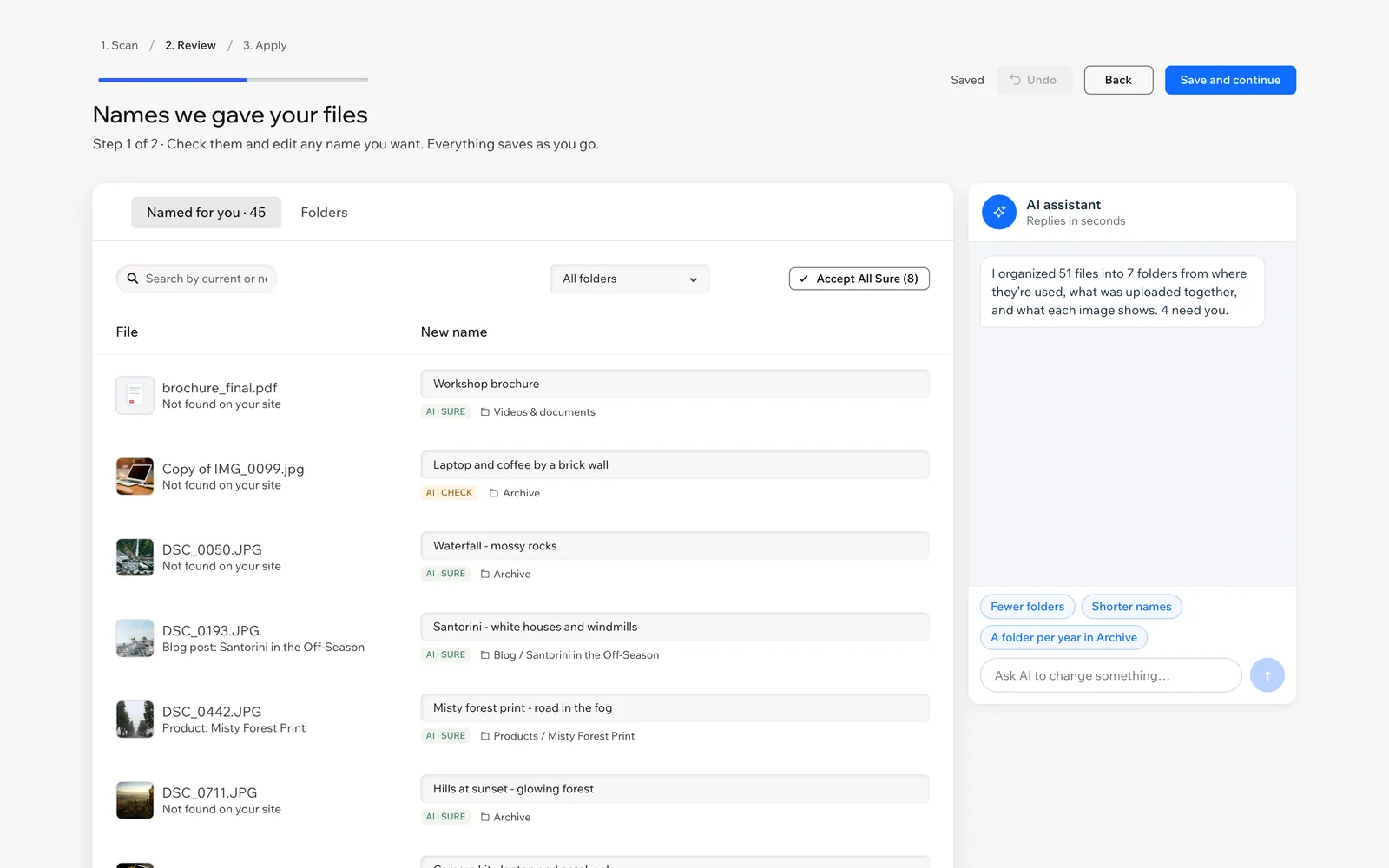
Open Media Organizer from your site’s dashboard and click Organize My Media.
The app lists your files and folders, reads your public pages to see where each file is used, and AI names the files from what they show. Nothing moves yet.
Check the names we gave your files and edit any of them, then deal with the few files that need you. Drag files between folders or ask the AI assistant: it proposes, you apply.
See what will change, then apply. If you change your mind, Undo puts the whole run back, for 30 days.
With Pro, new uploads get a name and a folder every week, automatically or after your approval.
The scan, the review and folders for every file are free. Pro and Business add clear AI names and keep new uploads tidy. Plans are billed through Wix, like any app in the Wix App Market.
$0
Folders for every file, and a taste of AI names.
$14.99 a month, or $99 a year (45% off)
Clear names for your files, and new uploads kept in order.
$24.99 a month, or $165 a year (45% off)
For large libraries and sites that add a lot of media.
There is no free trial. Your folders and names stay if you cancel a plan; cancel through Wix.
Yes. On Free, the full scan is free and every file goes into its folder, with AI names for 20 files and undo for 30 days. Pro ($14.99 a month or $99 a year, 45% off) adds AI names for 500 files a month, the weekly tidy-up and the AI assistant (40 requests a month). Business ($24.99 a month or $165 a year) has AI names for 1,000 files a month and 100 assistant requests. There is no free trial.
No. Every file keeps its web address, so every page shows the same images as before. Wix links each image by its ID, not by its name or folder. Only the names and folders in your Media Manager change.
Never a file. Files that aren’t used on any page go to an Archive folder you can look through at any time. When a run leaves old folders empty, those folders go to the Media Manager trash, and Undo brings them back while they’re there.
It reads your site’s public pages and finds the images each page shows. If your site isn’t published, or its pages can’t be read, nothing counts as in use: files then keep their folders, there is no Archive, and only the names change.
Yes, any run, for 30 days. Every file goes back to its old folder with its old name. The undo information is saved in your site’s CMS.
Your site’s language by default. You can pick any language for the names, and edit any name yourself in the review.
To describe and name your images, the app sends each image’s URL, its file name and where it’s used to Anthropic (Claude). If you use the AI assistant, your message and a summary of your folders go there too. Anthropic doesn’t train on API data, and we keep no copy of your files or names. To find bugs, the app keeps short usage and error logs for 90 days (site ID, plan, counts and error codes, never file names or images).
It’s part of Pro. Once a week, new uploads get a name and the right folder, following your folders and the names you fixed. Choose “Organize it for me”, or “Ask me first” (the default), where new files wait for your approval. It runs when you open the dashboard on or after the chosen day, or when you click Tidy Up Now. It doesn’t run in the background.
The Wix CMS, because the app keeps its settings, a saved review and the undo information there. If the CMS is missing, the app shows an “Add the CMS” button. You don’t need Wix Stores or any other app.
More answers on the support page.
Install Media Organizer, review what it proposes, and apply when you’re happy with it.